Illustration of a trick‑or‑treating figure inside a digital screen with festive banners and chat bubbles, representing virtual Halloween celebrations

How to Host a Virtual Halloween Party for a Remote Team

By Brett Martin •

To host a virtual Halloween party for a remote team, set a 60- to 75-minute program and pick a format that fits your headcount. Then send the invite two weeks out, prep prizes with non-costume options, test your video setup, and have one facilitator run a timed agenda. Without a timed agenda, one game can eat the hour, and the prizes never happen.

Most virtual Halloween party planning comes down to headcount: one video room holds up to 15 people, breakout rooms suit about 16 to 50, and bigger teams do better split into hosted games.

Key Takeaways

  • Plan a 60- to 75-minute virtual Halloween party with a clear agenda, choose a format that fits your headcount, and send the calendar invite about two weeks before the event with all key details locked in.
  • Timebox the main game segment, like a Halloween escape room or trivia block, with a hard stop. When you are running long, cut optional games first, then background chats, and protect the closing thank-you and prize moment.
  • Keep costumes and Halloween themes optional, and pair every costume contest or spooky activity with a non-costume way to participate so people who do not celebrate can still join.

Virtual Halloween Party Planning: Before You Start

Lock these down before you start planning anything else:

  • Date and time: a weekday in late October, with a start and end time that works across every time zone on the guest list.
  • Headcount: confirm an estimated number and whether the party is remote-only, hybrid, or in-office with remote joiners on a screen.
  • Attendance: make it optional. A party that feels like an obligation loses the point, especially for coworkers who are overloaded or do not celebrate Halloween.
  • Budget: set a rough per-person figure, or note that you will run no-budget options. Many formats cost nothing.
  • Roles: pick a primary facilitator and a backup co-host who can watch chat, manage breakout rooms, and keep each segment on time.

Step 1: Set the Date, Time, and Length for Your Remote Halloween Party

Pick a weekday close to October 31, like a Thursday afternoon, that avoids major deadlines or big organization-wide meetings. Providing a schedule for the event helps keep activities organized and high-energy, so set a 60- to 75-minute window as your default. A 30-minute version works if you cut it to one main activity. Microsoft's 2021 New Future of Work report describes a Human Factors Lab study in which fatigue began to increase 30 to 40 minutes into video meetings, so change activities before that point.

Check overlapping work hours across time zones so no region has to join very early or very late. For hybrid teams, have office groups gather in one meeting room with a large screen and audio while remote teammates join individually. Virtual Halloween office party ideas only work if both groups can play on equal terms. Choose a reliable virtual platform like Zoom or Microsoft Teams, and confirm that in-room and remote participants can hear and see each other clearly. Jabra's 2026 Cost of a Bad Meeting research found that 75% of meetings experience at least one technical failure, making an advance audio and video test especially important for hybrid parties.

Pitfalls: picking lunch hours without clarifying whether food is involved, booking too close to the end of the day when people drop off, or scheduling the party right before a major deadline or launch.

Step 2: Choose a Virtual Halloween Format That Fits Your Group Size

The format should match your headcount. Small groups can stay in one room, while larger teams need breakout rooms or multiple hosts to keep every team member active. Decide whether the party has one main activity, like a virtual escape room, or several shorter ones. The virtual Halloween party ideas for work that hold up best are short and timed: trivia, scavenger hunts, or story rounds.

For hybrid teams, cluster in-office people around one or two devices so remote teammates are not drowned out by room noise, and ask someone in the room to watch chat. Every game segment should work equally for people without costumes and for those who prefer non-scary themes like autumn trivia or a favorite-snack round.

Option A: Single-Room Halloween Hangout With Guided Activities (Up to 15 People)

Everyone stays in one video call. The facilitator guides one activity at a time:

  • Halloween trivia rounds on topics like horror movies or spooky history
  • a mini virtual costume contest
  • a show-and-tell of favorite sweet treats
  • a pumpkin carving contest, with everyone carving on camera

Keep rounds short and timed so quieter people get structured turns instead of a few voices taking over. The pitfall here is leaving it as open chat, where a few extroverts dominate and others go silent or turn cameras off.

Option B: Breakout-Room Virtual Halloween Party (About 16 to 50 People)

The facilitator starts with everyone together, then sends smaller groups into breakout rooms for Halloween entertainment. Good options include trivia, a Halloween-themed scavenger hunt, or a virtual dance party with a spooky playlist.

Suggest mixing people across teams or groups so remote participants meet people they rarely see, or keeping existing teams together if that fits the goal better. The risk is sending people to rooms without clear instructions or timers, which causes awkward silences and makes the party drag.

Option C: Hosted Game or Escape Room Experience (More Than 50 People, Split Into Teams)

Use a structured virtual murder mystery, escape room, or game-show-style event run by an internal facilitator or an external host, with groups competing on Halloween challenges. This option works best when people opt in and know the timebox, because escape room puzzles can run past their slot without a hard stop. Leave 10 to 15 minutes before or after the hosted block for casual chat and prize-giving so it feels like a party, not only a session.

Step 3: Send the Virtual Halloween Party Invite Two Weeks Out

Create a calendar invite roughly two weeks before the event with the final date, start and end time, meeting link, and any access codes. Set clear goals and expectations:

  • optional attendance
  • an optional Halloween costume
  • a suggested virtual background that fits the theme
  • the rough virtual Halloween party agenda with time blocks

Include a short RSVP poll covering comfort with spooky themes and interest in the costume contest. If you are mailing food or sending themed ingredient lists in advance for drink-making activities, collect allergies and dietary needs through a private form, not the group poll. For hybrid setups, spell out where in-office people go and which device they use, so the room avoids audio feedback. Vague invites that just say "virtual Halloween" without timing or structure lead to low turnout and confusion.

What Your Virtual Halloween Party Invite Should Say

  • Date and time with time zones, platform link
  • Dress code: "Costumes and virtual backgrounds welcome but not required"
  • One-line overview of the main activity so people know what to expect
  • Sample activities: Halloween games, a quick Halloween costume contest, and a non-costume "coziest mug" or "fall background" contest
  • One line about inclusion: non-Halloween or non-scary participation is welcome, such as autumn themes, fall snack trivia, or general movie trivia

Send a reminder two or three days before the event.

Step 4: Prepare Prizes, Recognition, and Non-Costume Alternatives

Pick 3 to 5 specific categories and list them on the agenda, such as:

  • "Most Creative Halloween Costume"
  • "Best DIY Background"
  • "Funniest Video Tile"
  • "Top Trivia Team"

Costume contests can be a fun centerpiece for virtual events when you pair each one with at least one non-costume recognition: "Best Pet Cameo," "Cozy Fall Outfit," or "Most Helpful Clue-Giver" in the escape room.

Plan voting with quick polls, reaction emojis, or simple chat votes with a clear time limit, so tallying does not eat into run time.

Pitfalls: too many prize categories that take ages to explain, or complicated voting rules that stall the party.

Low- or No-Budget Prize Ideas That Still Feel Special

  • Shout-outs in team chat the next day
  • A fun custom virtual background sent to winners
  • A "meeting-free hour" coupon approved in advance
  • Temporary control of the Halloween playlist for the next team call
  • Digital goodie bags that serve as post-event giveaways to surprise participants

Mailing small party favor boxes before the event can elevate the experience, but only attempt this if budget and shipping timelines allow. Candy, themed socks, or stickers work well in a mailed kit. Check delivery windows early in October, and do not promise physical prizes that cannot arrive until well after Halloween.

Step 5: Set Up and Test Your Virtual Halloween Party Space

Choose and test your video platform at least a few days before. Confirm breakout rooms, polling, screen sharing, and chat are enabled. Poor audio quality reduces engagement, causes miscommunication, and  increases participant fatigue, so test audio first.

Prepare a Halloween playlist of classic party songs like "Monster Mash" through a business music service or royalty-free tracks, not a personal streaming account. Playing background music can create a festive ambiance for the virtual event and keep the Halloween spirit alive during transitions. Test volume so music never drowns out voices. Build a simple themed slide deck if helpful: title slide with party name, agenda slide with timing, and activity instruction slides to screen share.

For hybrid rooms: test the conference room camera, mic, and speakers. Choose one device as the audio source and mute all others to avoid echo. Do not skip the tech run-through. Problems like people stuck outside breakout rooms or audio issues can eat the first 15 minutes.

Prep Materials and Links for Your Chosen Halloween Games

Gather trivia questions, scavenger hunt lists, or escape room links in a single document with backup copies. Pre-create any polls, timers, or shared documents for activities like Halloween costume contest voting or story prompts. Hunting for links live on the call slows momentum and makes the party feel disorganized.

Step 6: Run the Virtual Halloween Party on the Day

Log in 10 to 15 minutes early, start light background music, and admit people gradually so no one lands in a silent room. Open with a short welcome: thank people for joining, confirm that costumes and participation levels are optional, and walk through the virtual Halloween party agenda with timeboxes. An energetic host who manages the clock, announces transitions, and watches both chat and on-camera engagement makes the difference between a party and a meeting.

Rotate between segments: a quick icebreaker, the main Halloween game, then a prize and recognition block, with time for informal chat before closing. Never let a single activity, especially an escape room or complex trivia, run without a hard stop.

To keep everyone included, explain each activity with costume and non-costume paths side by side. Some people show off a Halloween costume while others share a favorite autumn snack or virtual background. Use prompts that are not horror-specific, like "favorite childhood fall memory" or "most unusual candy," for anyone who does not celebrate Halloween. The host thanks the whole group for joining however they like, costumed or not, camera on or off, without naming anyone who opted out.


Virtual Halloween Party Agenda: Two Sample Program Flows

Each agenda line carries a timestamp so you can paste it straight into the calendar invite. The facilitator announces a halfway mark and a 5-minute warning during the main game block, since that is where the schedule slips.

Example 60-Minute Virtual Halloween Party Agenda

Time

Segment

Facilitator action

00:00 to 00:05

Welcome and tech check

Greet arrivals, confirm audio and video, start background music

00:05 to 00:10

Icebreaker

Run a quick prompt: "Show us your costume, your mug, or your pet"

00:10 to 00:15

Agenda overview and team split

Walk through the schedule, send people to breakout rooms if needed

00:15 to 00:35

Main Halloween game or mini escape room

Run trivia, a scavenger hunt, or a short escape room puzzle with halfway and 5-minute warnings

00:35 to 00:45

Costume contest or "Favorite Mug / Background Show & Tell"

Guide quick rounds of show-and-tell, set up voting

00:45 to 00:52

Prize announcements

Read winners, award prizes, shout out non-costume categories

00:52 to 00:58

Open chat and informal hangout

Let people talk freely, play the spooky playlist

00:58 to 01:00

Closing thanks

Thank everyone, share any next steps or feedback link


Example 30-Minute Virtual Halloween Party Agenda

Time

Segment

Facilitator action

00:00 to 00:05

Welcome

Greet arrivals, confirm the one activity, set expectations

00:05 to 00:18

Fast-paced Halloween trivia or game

Run 3 to 4 quick rounds, keep score visibly

00:18 to 00:25

Quick voting and recognition

Chat votes for best costume, best background, top trivia score

00:25 to 00:30

Optional group screenshot and close

Offer a screenshot for anyone who wants to be in it (follow your organization's photo consent policy), then close

The facilitator must be strict on timing in this short format and choose one main activity only, skipping longer escape room puzzles. This variant suits groups with packed calendars or time zones that only share a narrow window.

What to Cut When Your Virtual Halloween Party Runs Long

Plan what to trim, and keep that order visible in your notes.

  1. Cut optional mini-games or bonus Halloween entertainment first, such as extra trivia rounds, a second scavenger hunt list, or a virtual magic show segment. The party still works without them.
  2. Shorten or skip open chat segments second. Keep one quick structured round for everyone to speak rather than extended free talk. A spooky spin on a rapid-fire question works better than five minutes of silence.
  3. Cut or simplify the costume contest third. Move from detailed categories to a single quick round of applause or chat shout-outs without full voting.
  4. The closing thank-you and prize announcement should almost never be cut. Ending abruptly without recognition makes the event feel unfinished and wastes the Halloween fun people showed up for.

The facilitator should watch the clock at the start of each block and quietly adjust, rather than realizing at the last minute that the schedule is 15 minutes over.

Why Virtual Halloween Parties Go Flat (and How to Fix It)

A small costume contest. A Halloween costume contest with only three entrants turns everyone else into passive observers. Fix this by adding parallel non-costume categories, or by making the contest a quick optional segment rather than the centerpiece. The more ideas you give people for participating without a costume, the more people participate.

Overlong instructions. Long explanations or complex game rules drain energy. Stick to simple, repeatable Halloween virtual games like rapid-fire trivia or yes/no polls with visual prompts. An interactive experience should feel like a party, not a training session.

Forced participation. Requiring cameras on or mandating costumes is a fast way to lose people. Not everyone wants to celebrate Halloween the same way, and mandatory attendance turns the party into an obligation. Use opt-in prompts and chat-based participation instead.

Remote people left watching. Hybrid setups often leave remote people watching a conference room have fun. Appoint an in-room "remote buddy" to keep the camera framed on the group and read remote chat aloud. Jabra's 2026 Cost of a Bad Meeting report found that about half of remote participants feel forgotten, talked over, or excluded during hybrid meetings. Without a remote buddy, the call turns into a broadcast rather than a party.

Virtual Halloween Party Formats by Group Size

Headcount decides more about the format than the theme does. The table below pairs each group size with a format, a length, and the one setup detail that tends to go wrong.

Which Virtual Halloween Party Format Fits Your Headcount

Group size

Recommended format

Suggested length

Notes

Up to 15

Single-room trivia, pumpkin carving contest, or quick costume contest

60 min (or 30 to 45 min for a shorter program)

Sustains open conversation; one facilitator is enough

16 to 50

Breakout-room trivia, virtual scavenger hunt, or virtual dance party with a Halloween playlist

60 min

Mix teams across groups; assign a breakout facilitator per room

More than 50

Hosted virtual escape rooms, virtual murder mystery, or game-show format with multiple hosts

60 to 75 min

Split into teams of 4 to 8; needs a co-host monitoring chat

Any size, hybrid

Any format above, with in-room cluster on one device

Add 5 min for tech check

Assign a remote buddy in the room; test audio in advance

Smaller groups can sustain more open conversation and a classic game format. Larger groups benefit from structured Halloween activities, clear roles, and a virtual event plan that keeps the whole team involved.

How Kumospace Can Help Remote Teams Host Virtual Halloween Parties

Many of the pitfalls above come from the video call itself:

  • breakout rooms people get stuck outside of
  • one loud conference room drowning out remote teammates
  • open chat where a few voices take over

A grid of video tiles also makes it hard to drift between small conversations the way people do at an in-person party.

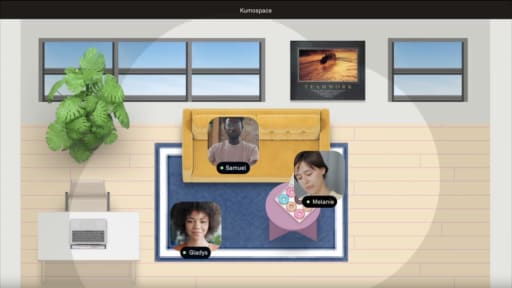
Kumospace is a virtual office platform for remote and hybrid teams.

With Kumospace's spatial audio, several small conversations can happen in the same space. That way, people move between groups without a facilitator reassigning breakout rooms. Teams that already work in a persistent Kumospace office can host the party in the space they use every day, so no one is learning a new tool on party day. A shared whiteboard can hold trivia scores or the costume-contest tally where everyone can see them.

Zoom or Microsoft Teams can still run a hosted escape room, while the virtual office holds the open-chat and hangout segments that tend to fall flat in a tile grid. This setup fits distributed and hybrid teams that run recurring social events, such as the ones in these virtual office party ideas, and want the informal part of the party to feel less like another meeting.

How to Host a Virtual Halloween Party That Runs on Time

Knowing how to host a virtual Halloween party comes down to three things: a 60- to 75-minute timed agenda, a format matched to headcount, and an invite sent about two weeks out. Single rooms work for up to 15 people, breakout rooms for about 16 to 50, and hosted games with co-hosts for larger groups. Every costume contest needs a non-costume path so people who don't celebrate can still join.

The facilitator watching the clock matters more than any single game. When the schedule slips, cut optional games first, then open chat, and protect the closing thanks and prize announcement so the party ends cleanly. In a hybrid room, run audio through one device and ask someone there to read remote chat aloud. Feedback gathered after the event makes next year's remote Halloween party easier to plan.

Frequently Asked Questions

Transform the way your team works from anywhere.

A virtual office in Kumospace lets teams thrive together by doing their best work no matter where they are geographically.

Headshot for Brett Martin
Brett Martin

Brett Martin is the President & Co-Founder of Kumospace. He has spent his career as a serial entrepreneur, either building or investing in technology startups. To date, he has invested in over 60 companies through his fund, Charge Ventures. Brett and his companies have received numerous awards and have been featured in hundreds of media outlets. Outside of tech, Brett founded an indie rock band, started a non-profit, and sailed 6,000 miles on a 30ft sailboat.

Transform the way your team works.